


 Contact Us
 Appliances
 Agri Inputs
 Auto Components & Accessories
 Beauty & Personal Care
 Electronics
 Fashion
 Grocery
 Gift Cards
 Home & kitchen
 Health & Wellness
 Vehicles & Automotives
 Books & Stationary
 Pet Care
 Toys & Games
Xpressbees Shopify Integration: 10 Things Shopify Sellers Should Know
Ecommerce Logistics
Key Takeaways
- Xpressbees Shopify integration can help Shopify sellers manage shipping, tracking, COD, and fulfilment for eligible orders.
- Using multiple logistics partners for Shopify gives sellers greater flexibility across rates, serviceability, delivery timelines, and locations.
- Mystore brings multiple carriers together through ShipKaro shipping aggregator for Shopify sellers, with tools for rate comparison, carrier routing, tracking, returns, and NDR management.
- Shopify India sellers can connect their existing store with Mystore and manage shipping and fulfilment from one connected platform.
As a Shopify store in India grows, shipping usually stops being a simple “pick a courier and dispatch” process. Different orders may need different carriers depending on PIN-code coverage, shipping cost, delivery timelines, COD availability, or return requirements.
When you connect Xpressbees to Shopify, you can manage many of these shipping tasks more smoothly. But there will still be situations where Xpressbees may not serve a particular location, another carrier may offer a better rate, or a different delivery option may work better for that order.
That is why many growing businesses prefer working with multiple logistics partners for Shopify instead of depending on one courier for every shipment.
An Xpressbees Shopify integration can simplify shipping, tracking, COD, and fulfilment. The bigger question is how easily you can switch between carriers when business needs change.
These 10 FAQs cover the most common questions around Xpressbees Shopify integration and also look at how Mystore helps Shopify sellers manage Xpressbees and other shipping partners through ShipKaro, its AI-powered shipping aggregator, with connected workflows for tracking, returns, NDR, and fulfilment.
Table of Contents
- Why Choosing the Right Logistics Partners for Shopify Matters as You Grow
- 10 Questions to Ask Before Starting Xpressbees Shopify Integration
- 1. Can I connect Xpressbees to Shopify for my store in India?
- 2. What gets synced after Xpressbees Shopify integration?
- 3. Can I offer COD orders after Xpressbees Shopify integration?
- 4. How much does Xpressbees shipping cost for Shopify orders?
- 5. What are the other shipping options when Xpressbees isn’t available for a particular Shopify order?
- 6. Can I use other logistics partners for Shopify along with Xpressbees?
- 7. Can I compare Xpressbees with other logistics partners before shipping an order?
- 8. Can I manage Xpressbees and other shipping providers from one dashboard on Shopify?
- 9. Can I track Xpressbees and other carrier shipments from one place?
- 10. Is using multiple logistics partners useful as my Shopify store grows?
- How Can Mystore Help You Manage Multiple Logistics Partners for Shopify?
- How to Get Started With the ShipKaro Shipping Aggregator for Shopify Sellers
- Conclusion
Why Choosing the Right Logistics Partners for Shopify Matters as You Grow
Choosing the right logistics partners for Shopify helps you manage changing delivery needs as your store grows. Multiple shipping options give you more flexibility across destinations, costs, delivery timelines, and serviceability.
For Shopify stores in India, this flexibility becomes even more important as delivery coverage and serviceability can vary across locations.
Here are some data points showing how modern customers value fast and convenient delivery:
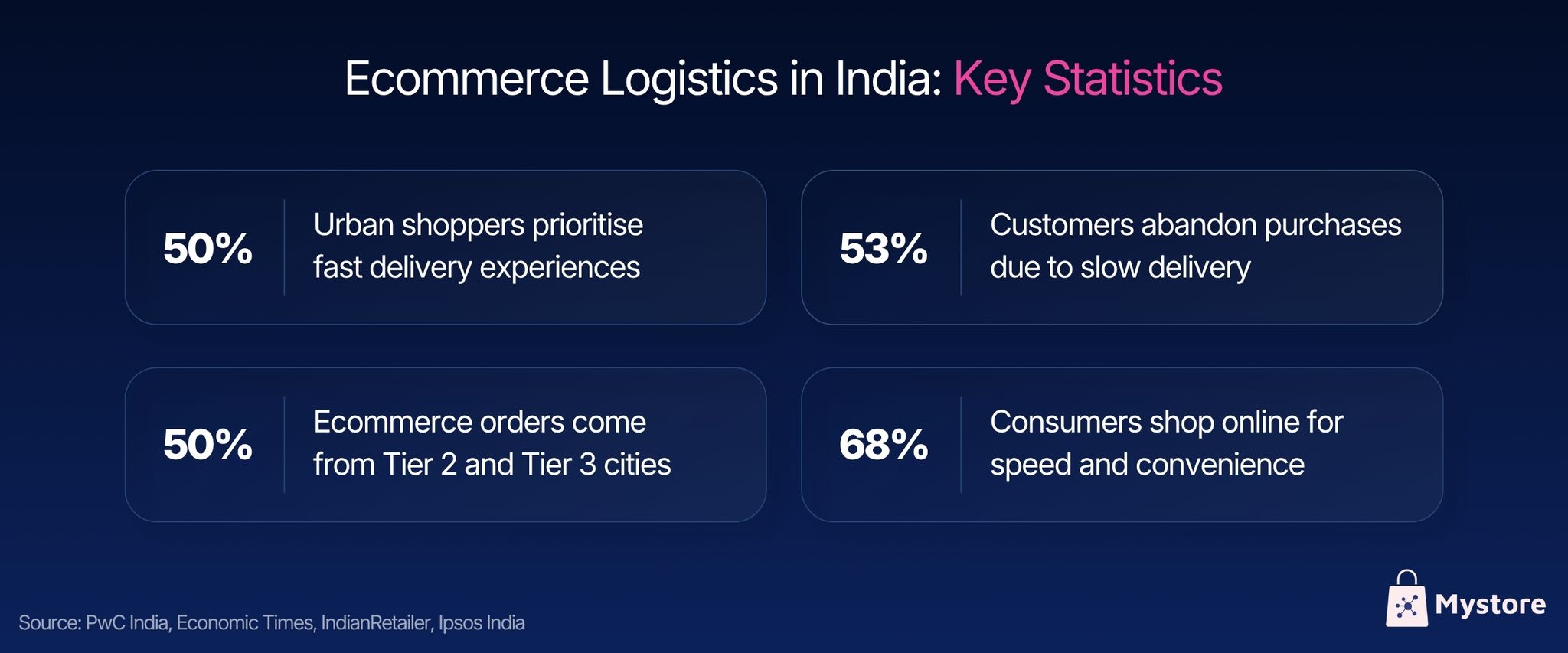
- 50% of urban shoppers prioritise fast delivery experiences
- 53% of customers abandon purchases due to slow delivery
- 50%+ of ecommerce orders come from Tier 2 and Tier 3 cities
- 68% of consumers shop online for speed and convenience
Source: PwC India, Economic Times, IndianRetailer, Ipsos India
The picture is clear: customers expect fast and reliable delivery. Xpressbees can help meet these expectations, while having multiple logistics partners for Shopify gives sellers more flexibility to choose the right shipping option for each order.
10 Questions to Ask Before Starting Xpressbees Shopify Integration
Here are the 10 important questions Shopify sellers should ask about Xpressbees Shopify integration before choosing it for their shipping needs:
1. Can I connect Xpressbees to Shopify for my store in India?
Yes, Shopify sellers in India can connect their store with Xpressbees through available integration options and use it for shipping and fulfilment. Once connected, you can process eligible Shopify orders for shipment creation, tracking, delivery updates, and other fulfilment activities through the connected setup.
Before getting started, sellers should check the integration requirements, supported shipping workflows, serviceable PIN codes, and applicable charges. This helps ensure that the setup fits their current order volumes and the locations they serve.
2. What gets synced after Xpressbees Shopify integration?
After Xpressbees Shopify integration, you can send eligible Shopify orders to Xpressbees for shipping and fulfilment. Depending on your setup, details such as customer information, delivery address, order details, payment status, and fulfilment information can sync automatically, so you don’t have to enter the same information manually.
The exact sync options may vary based on the integration and configuration. Before getting started, check which order updates, cancellations, status changes, and return-related actions are supported.
3. Can I offer COD orders after Xpressbees Shopify integration?
Yes, you can offer COD orders after Xpressbees Shopify integration, as long as the order meets the required COD and serviceability conditions. You can process eligible COD shipments and track their delivery status through your shipping setup. Before you enable COD, check the charges, serviceable PIN codes, remittance timelines, and RTO terms so you know what to expect.
For buyers, COD gives them the option to pay when the order arrives instead of paying online upfront. This can be useful for first-time customers or shoppers who prefer cash payments.
4. How much does Xpressbees shipping cost for Shopify orders?
Xpressbees shipping costs can vary depending on factors such as shipment weight and dimensions, delivery location, shipping zone, service type, and other applicable charges. There is therefore no single shipping rate that applies to every Shopify order shipped using Xpressbees.
5. What are the other shipping options when Xpressbees isn’t available for a particular Shopify order?
If Xpressbees is not serviceable for a particular Shopify order, the seller needs to configure another best 3PL for Shopifythat can deliver the order. This becomes especially important for Shopify stores in India shipping across different regions, where carrier coverage and delivery capabilities can vary.
Relying on a single courier can make such situations harder to manage because sellers may need to find an alternative manually. Mystore reduces this dependency by giving sellers access to multiple logistics partners through one connected shipping setup, making it easier to choose an available carrier for each order.
6. Can I use other logistics partners for Shopify along with Xpressbees?
Yes. Even if you use Xpressbees, you can use other logistics partners for Shopify when another provider offers better pricing, delivery timelines, or serviceability for a particular order.
Having multiple carriers can be useful when different providers perform better across different regions or shipment requirements. However, if you connect each provider separately, you may need to manage multiple integrations and check rates, delivery timelines, and serviceability across different apps or dashboards. A multi-carrier setup like Mystore’s ShipKaro shipping aggregator for Indian sellers can bring these options together for easier comparison and shipping management.
7. Can I compare Xpressbees with other logistics partners before shipping an order?
Yes, but a basic Xpressbees Shopify integration does not give you a complete view of other carriers. To compare multiple logistics partners for Shopify in one place, you need a multi-carrier shipping setup.
With Mystore, Shopify sellers can view different courier options together and compare shipping costs, delivery timelines, PIN-code serviceability, availability, and performance. This makes it easier to choose a suitable carrier for each order without checking different systems separately.
8. Can I manage Xpressbees and other shipping providers from one dashboard on Shopify?
Not with a basic Xpressbees integration alone. If you rely on multiple shipping providers, you may need to use different apps, integrations, or dashboards to manage your shipments. As your order volume grows, keeping track of rates, labels, tracking, returns, NDRs, and fulfilment across different platforms can quickly become difficult and time-consuming. A centralised shipping setup can bring these activities together, making it easier to manage your shipping operations from one place.
9. Can I track Xpressbees and other carrier shipments from one place?
Yes, Shopify can display tracking information for Xpressbees and other supported carriers through their respective integrations. However, the level of tracking visibility and shipping control can vary depending on the carrier and integration.
If you manage multiple best 3PL for Shopify, you can use Mystore to leverage a unified shipping dashboard that lets you track shipments, compare carrier performance, manage returns and NDRs, generate shipping documents, and handle fulfilment from one place.
10. Is using multiple logistics partners useful as my Shopify store grows?
Yes, using multiple logistics partners for Shopify can give growing businesses more flexibility with shipping costs, serviceability, delivery times, and reach. It also gives sellers backup options when one carrier isn’t available or isn’t the right fit for a particular order.
For Shopify India sellers expanding into new cities or serving customers across different regions, having multiple shipping options can make fulfilment easier. The right setup depends on factors such as order volume, customer locations, product type, and delivery expectations.
How Can Mystore Help You Manage Multiple Logistics Partners for Shopify?
Mystore helps Shopify sellers manage multiple shipping providers from one connected platform without rebuilding their existing store.
Sellers can use Xpressbees and other logistics partners for Shopify to choose suitable shipping options for different orders while handling shipping, tracking, returns, and fulfilment from a single place. This makes day-to-day shipping easier to manage as order volumes grow.
Here’s how Mystore simplifies Shopify shipping:
1. Access Multiple Carriers from One Place: Use Xpressbees alongside Delhivery, India Post, Shiprocket, Porter, ONDC Network logistics, and other logistics partners for Shopify without switching between separate systems.
2. Choose Shipping Based on Order Needs: Compare available shipping options by delivery location, shipping cost, package details, delivery timelines, and serviceability before assigning a carrier.
3. Get Quick Answers with AI Assistance: Use Mystore Mitra to check order, shipment, and delivery-related queries and get quick responses in English, Hindi, or Tamil.
4. Connect Multiple Sales Channels: Manage orders coming from your Shopify store, Mystore storefront, ONDC Network, WhatsApp commerce, and other channels through one connected commerce setup.
5. One-click WhatsApp Order Fulfilment: Get orders on WhatsApp, schedule pickups, and access shipping labels, AWBs, and tracking details through a streamlined fulfilment workflow.
6. Manage Shipping from a Central Dashboard: Handle labels, AWBs, pickups, shipment tracking, returns, NDRs, and other fulfilment tasks without jumping between multiple platforms.
7. Automate Carrier Selection: Automatically route orders using ShipKaro shipping aggregator for Shopify sellers based on destination, package weight, order value, shipping cost, delivery speed, and serviceability.
8. Monitor Carrier and Delivery Performance: Get visibility into delivery timelines, SLA adherence, RTOs, and carrier performance to identify shipping issues and improve fulfilment decisions.
9. Handle High-Volume Shipping More Efficiently: Create and manage multiple shipments, labels, manifests, and multi-package orders in bulk as your Shopify order volume grows.
10. Sync Shopify with Mystore: Keep selling through your existing Shopify india store while syncing products, inventory, prices, and orders with Mystore, allowing you to manage shipping without rebuilding your storefront.
How to Get Started With the ShipKaro Shipping Aggregator for Shopify Sellers
Shopify India sellers can get started with ShipKaro as a logistics partner through Mystore in five simple steps.
The process helps sellers bring their existing commerce data on Shopify to Mystore and set up their commerce and shipping operations. They can continue using their existing Shopify store without the need to rebuild their ecommerce setup.
Here is the step-by-step process to connect Mystore’s logistics partners for Shopify:
- Sign up on Mystore and create your storefront while continuing to run your existing Shopify store in India.
- Connect Shopify with Mystore and sync your products, inventory, prices, and orders.
- Choose a Mystore plan at a nominal monthly fee to access Shopify sync, COD, multiple shipping options, and AI-powered logistics tools.
- Select from Xpressbees, ShipKaro®, ONDC on-network logistics, India Post, and other logistics partners for Shopify based on your shipping needs.
- Track orders, manage returns and NDRs, process shipments, and automate routine fulfilment tasks from one platform.
Conclusion
Xpressbees can be a useful shipping option for Shopify sellers, but your shipping strategy does not have to stop at one courier. As your store grows, having access to multiple logistics partners for Shopify can give you greater flexibility across rates, serviceability, delivery timelines, and fulfilment requirements.
Whether you want to connect Xpressbees to Shopify, explore Xpressbees Shopify integration, or add more shipping options, Mystore gives Shopify sellers a connected way to manage fulfilment without rebuilding their existing store.
With the ShipKaro shipping aggregator for Shopify sellers, businesses can bring multiple shipping options together, manage orders and tracking, handle returns, and build a more flexible shipping operation from one platform.
Want to simplify Shopify shipping and explore multiple logistics options from one connected platform?
Book a demo to create your online store on Mystore .