


 Appliances
 Agri Inputs
 Auto Components & Accessories
 Beauty & Personal Care
 Electronics
 Fashion
 Grocery
 Gift Cards
 Home & kitchen
 Health & Wellness
 Vehicles & Automotives
 Books & Stationary
 Pet Care
 Toys & Games
 Contact Us
Product Export
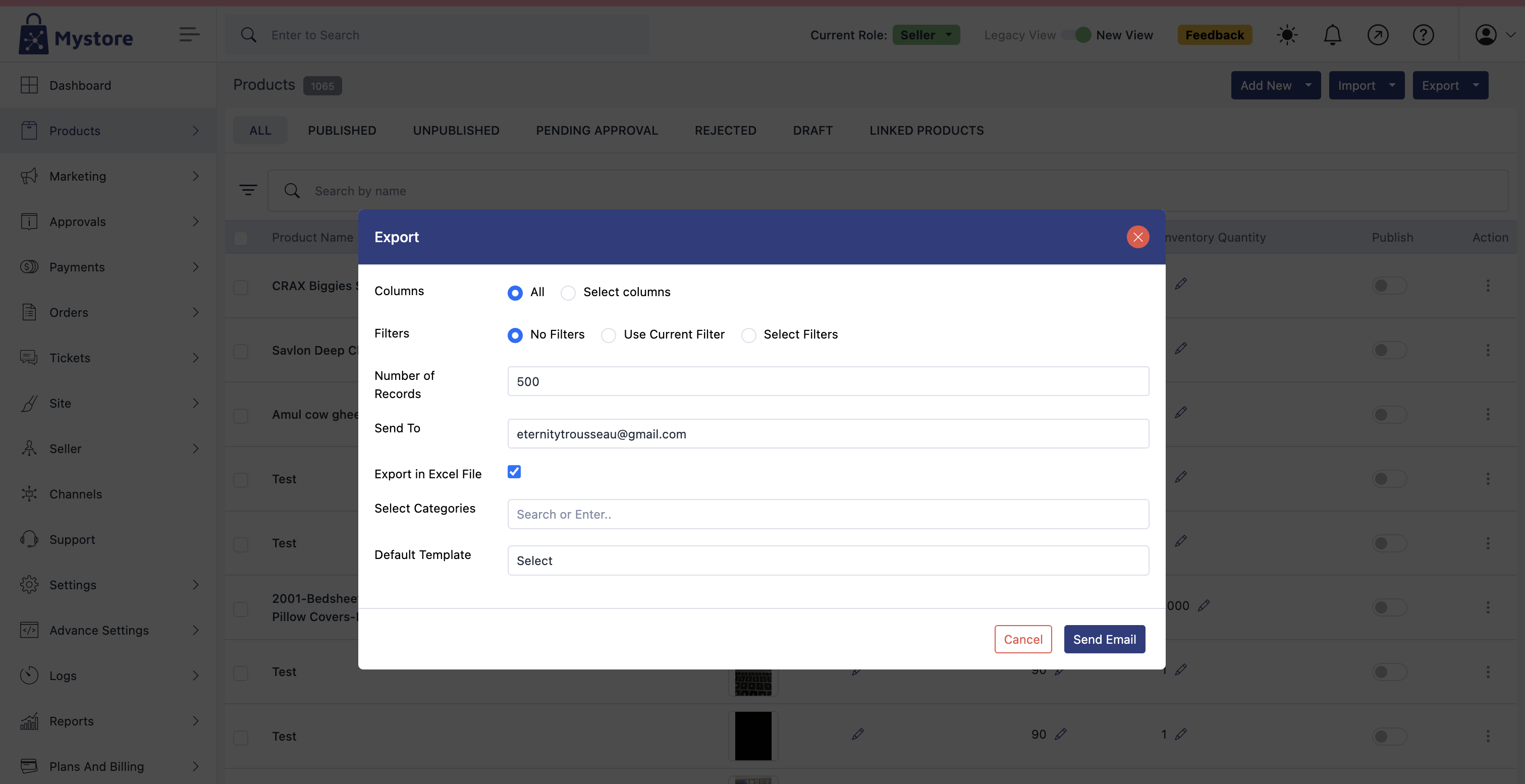
The Export option allows you to download your product data in a structured file format (Excel), which is useful for record-keeping, analysis, or migration.
Steps to Export Products
Access the Export Tool
- Navigate to the Products section.
- Click on the three-dot menu at the top-right corner.
- Choose “Export” from the dropdown.
A popup will appear (as shown in the image), allowing you to customize your export options.
Fill in Export Preferences
Field | Description |
Columns | By default, “All” columns are selected. Choose “Select Columns” if you want to pick specific fields to export. |
Filters | Choose how to filter your exported data:• No Filters – export all products.• Use Current Filter – applies filters already set on the product list page.• Select Filters – allows you to define custom filters using: - Field (e.g., Product Name, Brand) - Operator (e.g., equals, contains) - Value (text or number) |
Number of Records | Enter how many product records you want to export (e.g., 500). |
Send To | Provide the email address where the exported file should be delivered. |
Export in Excel File | Check this box if you want the export in Excel (.xlsx) format. |
Select Categories | Optionally filter products by category. Start typing to search and select. |
Default Template | If a predefined export template is available, you can select it here. |
Final Step
- After setting your preferences, click on “Send Email”.
- The system will generate the file and send it to the email address you provided.
You can cancel the export setup anytime by clicking “Cancel” at the bottom left of the popup.