Mystore®Mystore® is a full-stack, AI-powered open network marketplace built in India for sellers and brands of every size. One integrated, omnichannel platform to build, operate, and market on WhatsApp, ONDC, Own Store, Ai Agents and beyond.
For buyers, the Mystore Buyer App opens up seamless shopping across categories from a growing community of trusted Indian sellers."https://www.mystore.in/s/62ea2c599d1398fa16dbae0a/66defda954ce55002beebf8c/mystore-logo-480x480.png
9th Floor, Tower A, Spaze iTech Park, Sector 49122018Gurgaon DivisionIN
Mystore®https://www.mystore.in
9th Floor, Tower A, Spaze iTech Park, Sector 49Gurgaon Division, IN
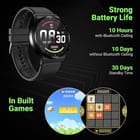
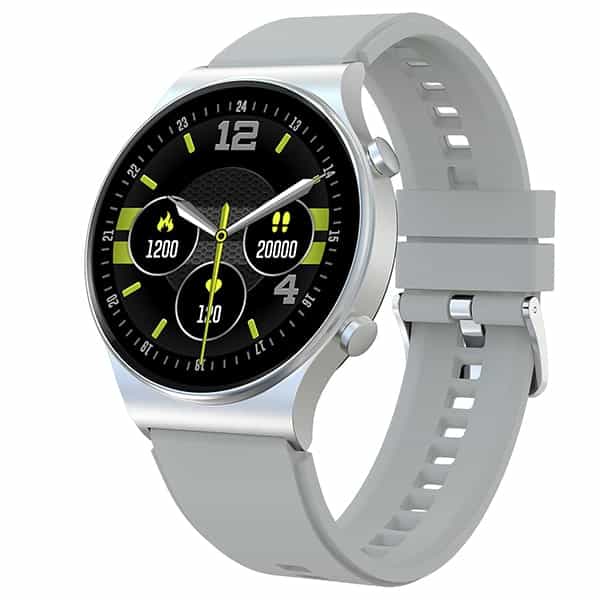
Bluetooth Calling Watch - Fire-Boltt 360 Pro enables you to make and receive calls directly from your watch via the built-in speaker and microphone. This smartwatch features a dial pad, option to access recent calls & sync your phone’s contacts.
How to activate Bluetooth Calling - To enable Bluetooth Calling Function, first connect it to the compatible app. Once connected, manually go to the phone's Bluetooth settings and pair (Bluetooth Name: BSW017). Upon pairing, you will get a notification: Connected for calls and audio.
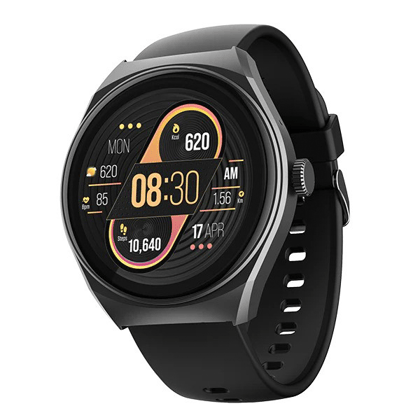
360*360 High Retina Display Resolution - 1.32 inches HD Color screen Full capacitive touch, supporting taps and swipes.
Temperature Monitoring - The watch can monitor your temperature.
SPO2/ Oxygen, Heart Rate - Fire-Boltt 360 Pro Smartwatch comes with real time 24*7 SPO2 / Blood Oxygen tracking, Dynamic Heart Rate Monitoring
Connect Earpods & Play & Save Local Music - The watch allows you to connect your earpods and enjoy listening to music with this cross connection. Store your favourite music in the watch as local music. Play favourite music on the watch with the in-built speaker
Bluetooth Calling Watch - Fire-Boltt 360 Pro enables you to make and receive calls directly from your watch via the built-in speaker and microphone. T...
Bluetooth Calling Watch - Fire-Boltt 360 Pro enables you to make and receive calls directly from your watch via the built-in speaker and microphone. This smartwatch features a dial pad, option to access recent calls & sync your phone’s contacts.
How to activate Bluetooth Calling - To enable Bluetooth Calling Function, first connect it to the compatible app. Once connected, manually go to the phone's Bluetooth settings and pair (Bluetooth Name: BSW017). Upon pairing, you will get a notification: Connected for calls and audio.
360*360 High Retina Display Resolution - 1.32 inches HD Color screen Full capacitive touch, supporting taps and swipes.
Temperature Monitoring - The watch can monitor your temperature.
SPO2/ Oxygen, Heart Rate - Fire-Boltt 360 Pro Smartwatch comes with real time 24*7 SPO2 / Blood Oxygen tracking, Dynamic Heart Rate Monitoring
Connect Earpods & Play & Save Local Music - The watch allows you to connect your earpods and enjoy listening to music with this cross connection. Store your favourite music in the watch as local music. Play favourite music on the watch with the in-built speaker



 Warranty


 Contact Us
 Appliances
 Agri Inputs
 Auto Components & Accessories
 Beauty & Personal Care
 Electronics
 Fashion
 Grocery
 Gift Cards
 Home & kitchen
 Health & Wellness
 Vehicles & Automotives
 Books & Stationary
 Pet Care
 Toys & Games